
Windows Updates Via Intune
What Is Patching via Intune?
Patching via Intune ensures that all managed devices stay secure and up to date with the latest Windows updates, drivers, and Microsoft 365 app patches — without manual intervention
Doing patching via Microsoft Intune means using Update Rings in Intune to automatically deploy Windows and Microsoft application updates to managed devices.
Prerequisites of Windows Device Patching/Updates: Before you start:
- Devices must be Entra ID joined or Hybrid joined.
- Devices must be Intune-managed.
- Ensure Windows Update service is running on the endpoint.
- Windows version must be Windows 10/11 Pro, Enterprise, or Education.
Go to Microsoft Intune admin center →
Devices → Windows → Update rings for Windows 10 and later.
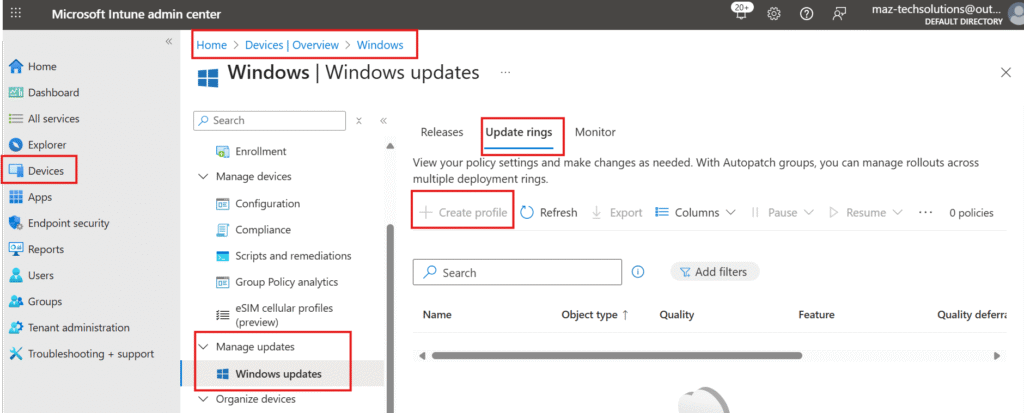
- Click + Create profile.
- Enter a name like Corporate Windows Update Ring.
- Configure key settings:
- Servicing channel: Semi-Annual Channel (recommended for most orgs)
- Microsoft product updates: ✅ (to include Office updates)
- Driver updates: optional (can be enabled or disabled)
- Quality updates: choose the deferral period (e.g., 7 days)
- Feature updates: choose deferral period (e.g., 90 days)
- Automatic update behavior: Auto install at maintenance time
- Restart checks: Allow or disallow user deferrals
- Click Next → assign to your device groups → Create.
Difference between Quality updates and Feature updates
Quality updates are frequent, smaller releases providing bug fixes, security patches, and minor features, typically monthly. Whereas Feature updates are major annual releases that introduce significant new functionalities, enhancements, and all previous quality updates into a new version of the operating system)
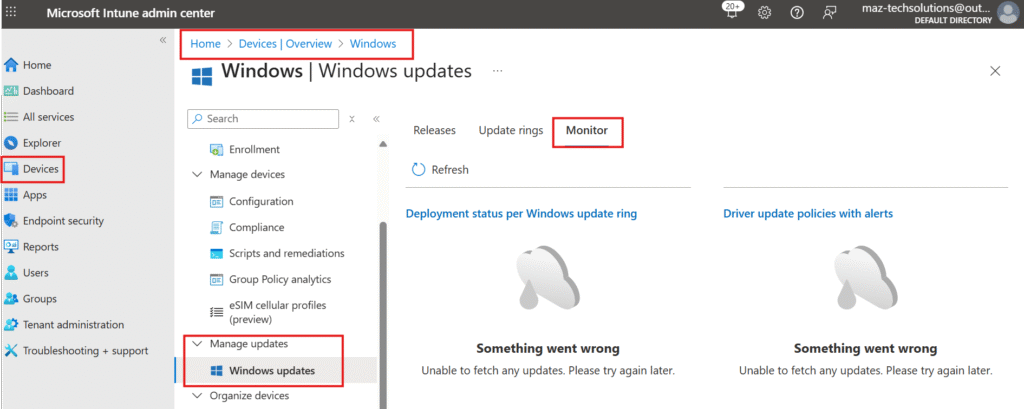
Monitor Update Status You can view update compliance in:
📍Devices →Windows > Manage Updates > Monitor → shows which devices are missing updates

Syed Raza
Excellent!