What are Azure Resources and Resource Groups
What is Resource in Azure
A manageable item that is available through Azure. Virtual machines, storage accounts, web apps, databases, and virtual networks are examples of resources.
The 3 Different Azure Resources
While there are many more than just three Azure resources, we will highlight three commonly used resources:
Virtual Machines (VMs): Azure VMs are on-demand, scalable computing resources that
Azure App Service: This is a fully managed platform for building, deploying, and scaling web apps, whether they are web, mobile, or API-based. Azure App Service supports various programming languages and frameworks, such as .NET, Java, Node.js, Python, and PHP.
Azure Storage: Azure Storage is a highly available, durable, and scalable cloud storage solution. It offers multiple storage services, including Blob storage, File storage, Queue storage, and Table storage, which cater to different data storage and access requirements.
What is Resource Groups in Azure
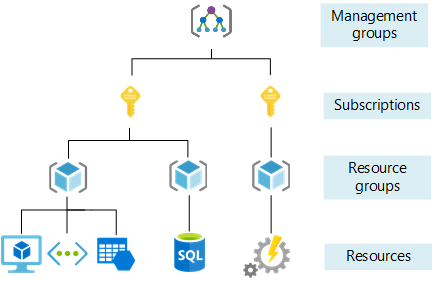
A Resource Group is a logical container for resources deployed within an Azure subscription. It helps in organizing, managing, and monitoring resources collectively based on their relationship to each other.
Resource Group needs an Azure Subscription. Single subscription can have multiple RG.
Azure Resource Group Example
To better understand the concept of a Resource Group, let’s consider a simple example. Suppose you are developing a web application that includes several components such as a web server, a database server, and a storage account. In Azure, you would deploy these components as individual resources like a virtual machine for the web server, an Azure SQL Database for the database server, and an Azure Storage Account for storage.
Instead of managing these resources separately, you can group them under a single Resource Group, named “MyWebAppResourceGroup,” for instance. This approach simplifies the management of your application’s resources, making it easier to monitor, manage access, and apply consistent policies.