
Remote Desktop Connection “CredSSP encryption oracle remediation” Error
If you are trying to start a remote session through Remote Desktop Connection and receiving the error message “CredSSP encryption oracle remediation”

Fix:
to work around this issue, follow these steps:
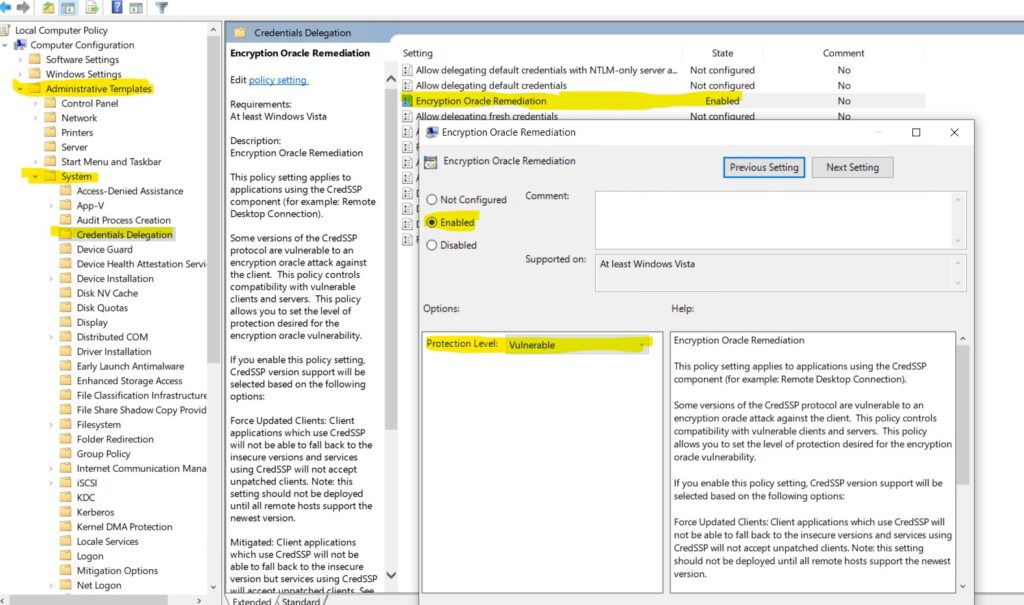
- On the client Machine from which you are not able to RDP, run gpedit.msc, and then browse to Computer Configuration > Administrative Templates > System > Credentials Delegation in the navigation pane.
- Change the Encryption Oracle Remediation policy to Enabled, and then change Protection Level to Vulnerable.

Mustafa shah
Incredibly educational